



Top 4 Bulk Payment Solutions in HK for SME

Galih Gumelar

Summary
A bulk payment solution pays many recipients from 1 file. It swaps repeated manual transfers for a single upload and approval.
Hong Kong banks moved Autopay to FPS. Batch payments in HKD and RMB now run on the Faster Payment System at banks such as DBS.¹ ²
Limits and fees differ by provider. Some set a payee cap or a package quota, so ask for the fee schedule and cut-off before you commit.
Controls matter as much as speed. Payee-name checks, a second reviewer and amount-based approvals stop costly errors.
Cross-border batches need a different rail. Overseas payees usually use local rails where available or SWIFT otherwise.³
A bulk payment solution lets a business pay many suppliers, staff or freelancers from 1 file instead of 1 payment at a time. For a Hong Kong SME, the right choice depends on the rail it runs on, the approvals it supports and what the provider states about limits and fees.
This guide explains the Hong Kong rails, compares 4 top options and shows a worked example. It also covers how to choose a tool and keep every batch safe.
What is a bulk payment solution?
A bulk payment solution is a bank service or payment tool that sends many payments from 1 uploaded file or 1 instruction. The payer lists each recipient, amount and reference, then approves the whole batch once.
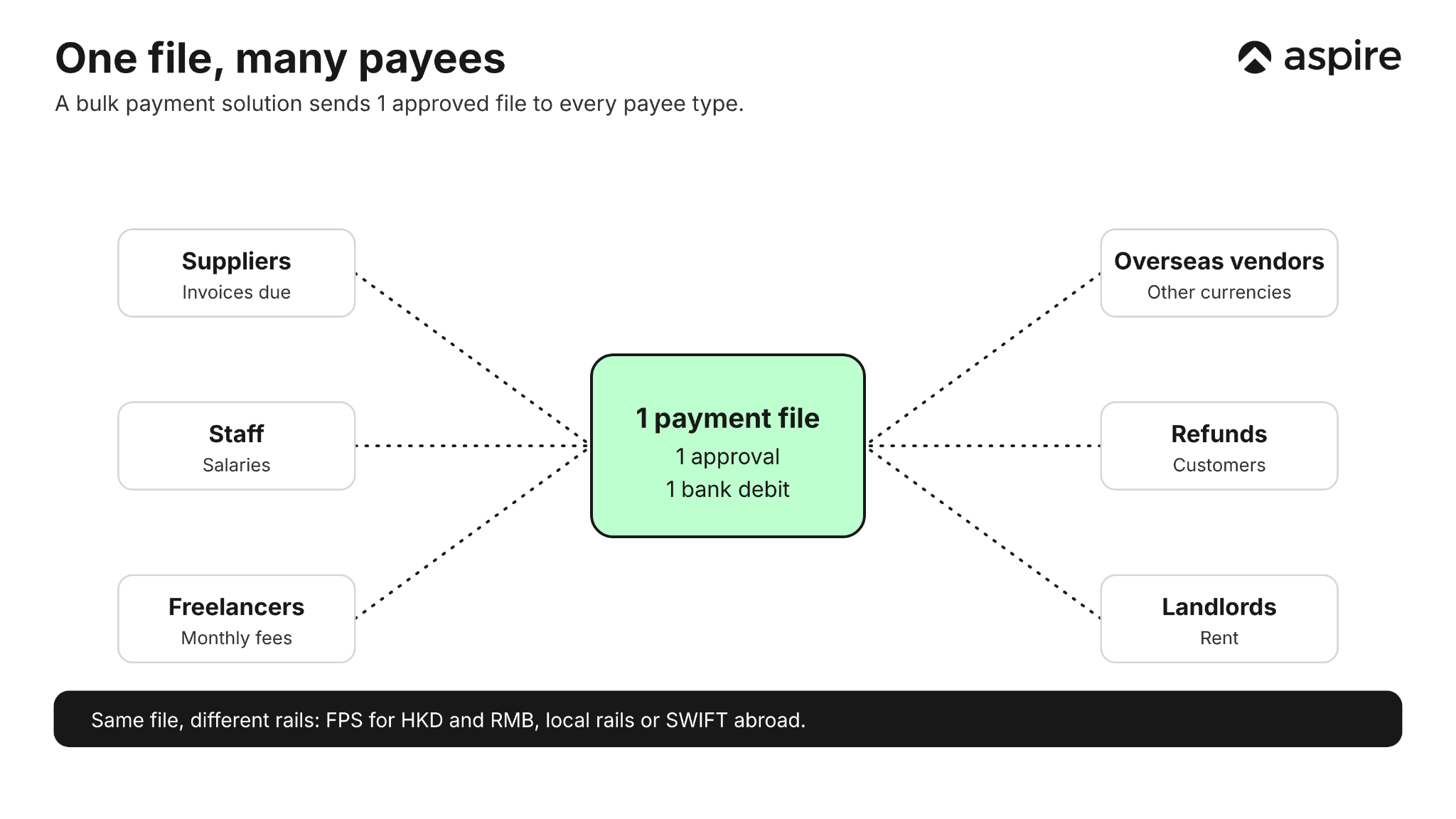
Bulk payments save the most time when the same group is paid on a regular cycle. Our guides to payroll methods and managing payroll in Hong Kong cover salaries, and this guide covers all payees.
Which rails power bulk payments in HK?
Most Hong Kong bulk payments run on the Faster Payment System, with RTGS and SWIFT used for large or cross-border payments. The right rail depends on the currency, the amount and the destination.
| Rail | Best for | Note |
|---|---|---|
| Batch FPS | Domestic HKD and RMB payments, such as salaries and supplier invoices | Replaced Autopay at banks under an industry upgrade² |
| RTGS (CHATS) | Large-value domestic payments | See our guide to CHATS and FPS |
| SWIFT or local rails abroad | Overseas suppliers | Local rails apply where available³ |
FPS launched in September 2018 and handled about 1.25 million transactions a day in 2023.⁴ The HKMA says companies can pay salaries through FPS using HKID numbers.⁴
Which are the top bulk payment tools?
These 4 options publish how they run bulk payments, and the table sets them side by side. Figures can change, so check each provider's current terms.
| Solution | How bulk payments work | Stated limits and fees | Confirm with provider |
|---|---|---|---|
| Aspire bulk payments | 1 CSV pays thousands of local and overseas payees, with approvals set per user | No registration or subscription fees; bulk fees are lower than individual transfers | / |
| DBS payroll and bulk payment | Enter payments in IDEAL, use the Excel Payment File Generator or connect by IDEAL Connect; Batch FPS pays HKD and RMB¹ | Same-day processing before 7:00 PM; future-dated instructions up to 90 days¹ | Payee limits and fees |
| HSBC Payment Services Monthly Package | A monthly plan covers FPS-out, autoPay-out, RTGS and TT⁵ | The Local example is HKD 100 a month with 30 FPS or autoPay-out transactions⁵ | How a batch counts against the quota |
| Airwallex batch transfers | Complete a template and upload it to pay up to 1,000 recipients across countries and currencies³ | Multi-layer approvals by amount; local rails where possible, SWIFT otherwise³ | Fee amounts and batch cut-offs |
Ask each provider for its fee schedule and cut-off times before you commit. See our comparison of top multi-currency accounts in Hong Kong.
How do you choose a bulk payment tool?
Choose the tool that matches your payee mix, your approval needs and your accounting software. The checklist below keeps the decision practical.
- Payee mix. Check whether it pays local, overseas or both.
- Rail and cut-off. Confirm the same-day deadline for your currency.
- Batch size. Compare the payee cap or quota with your monthly volume.
- Approvals. Look for amount-based approvals and a second reviewer.
- Accounting sync. Check that payments post to your books, such as Xero.
- Total cost. Add transfer fees, any plan fee and FX.
How do you make a bulk payment?
You make a bulk payment by building a file, checking it, approving it and releasing it. The steps are similar across providers.
- Collect payee details. Use the name on each bank account, not a nickname.
- Build the file. Fill in the provider's template with amounts and references.
- Upload and validate. Fix any rows the system rejects.
- Check the totals. Compare the batch total with your payables report.
- Approve the batch. An authorised approver signs off.
- Reconcile. Match the debit and each payee to your invoices.
Our guides to accounts payable and accounts payables 101 explain how to keep the underlying invoices clean.
How does an HK firm pay 200 payees?
This illustrative example shows how a bulk file turns 200 payments into 1 instruction. All names and figures are invented, and the time estimates are assumptions.
A Hong Kong design studio pays 140 freelancers and 60 suppliers each month. It used to key in each payment, then switched to 1 batch file.
| Task | One by one | Bulk file |
|---|---|---|
| Instructions to approve | 200 | 1 |
| Assumed entry time | About 10 hours at 3 minutes each | About 1 hour to build and check |
| Payee errors | Found after a rejection | Assumed to be flagged on upload |
The saving grows with the number of payees, and the file also leaves 1 record of who was paid and when. Pair it with cash flow management so the account holds enough before release.
How do you keep bulk payments safe?
Layered approvals stop a single mistake from reaching the bank. The diagram shows a typical 4-layer flow.
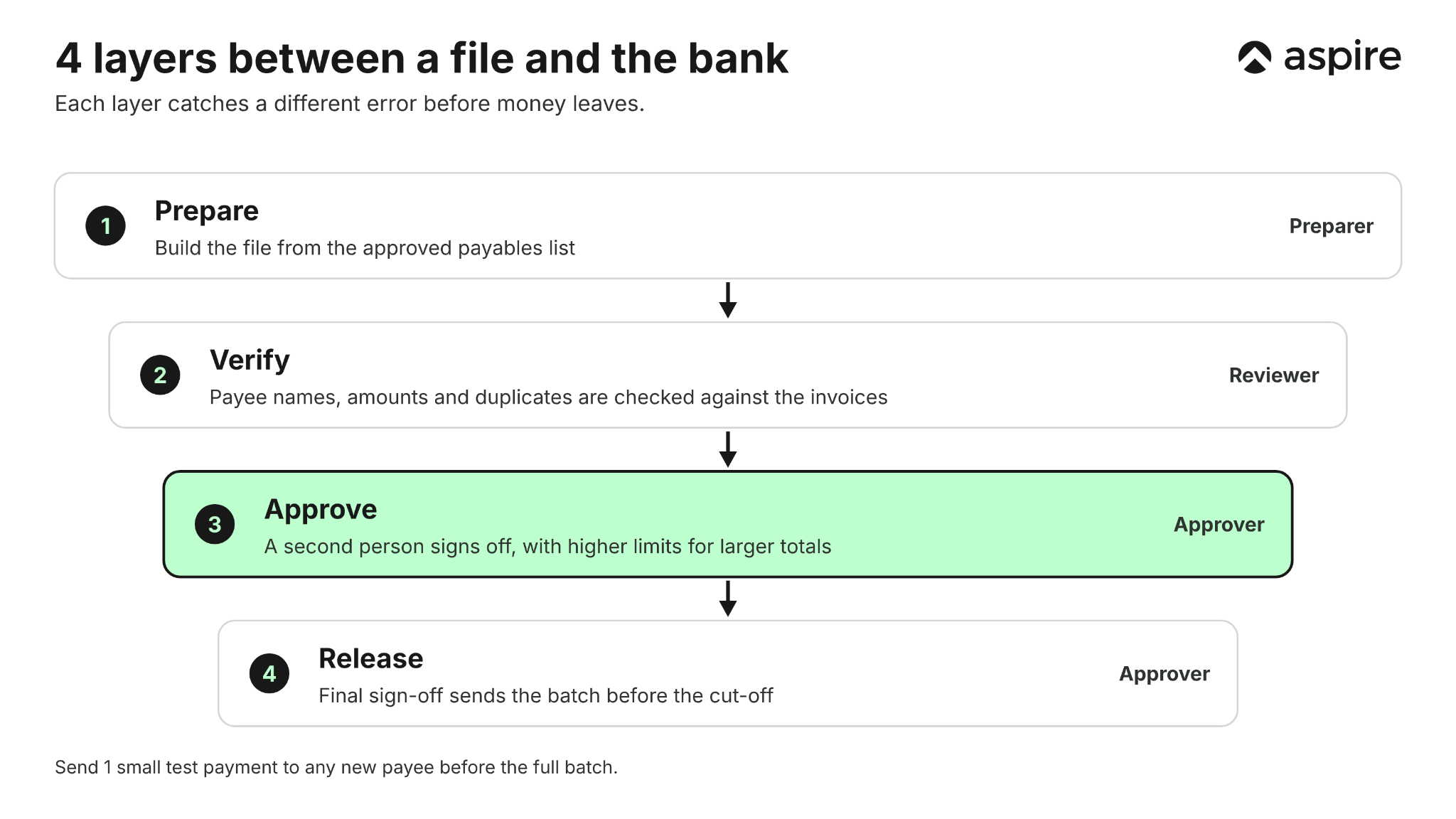
Payee names matter in Hong Kong. One bank said that, after its FPS migration, the payee name may be checked against the account holder name.²
For FPS payments to a mobile number or email, the HKMA launched a Suspicious Proxy ID Alert in 2023 to reduce fraud risk.⁴ Test a new file with 1 small payment before sending the full batch.
How do you reconcile a bulk payment?
A bulk payment appears as 1 debit on your bank statement, so you match it to a batch report, not to each invoice. DBS, for example, shows payroll as 1 consolidated debit.¹
- Keep the batch file. It is your list of who was paid and how much.
- Match the total. The debit should equal the file total.
- Match each line. Tick off every payee against its invoice or payslip.
- Chase exceptions. Follow up rejected or returned rows the same day.
Accounting sync shortens this work, because payments post against bills automatically. Our Xero tutorial shows the matching logic.
What mistakes break a bulk payment?
Most failed batches come from bad payee data, not from the bank. Check these 6 points before every upload.
- Wrong account name. The name must match the bank record.
- Wrong currency. HKD and RMB batches need separate lines or files.
- Missed cut-off. A file sent after 7:00 PM may miss same-day processing at DBS.¹
- Duplicate rows. Sort the file by payee and amount before sending.
- Stale payee list. Remove suppliers you no longer use.
- No test payment. Send 1 small payment to any new payee first.
The 6 checks take minutes and prevent a batch from being returned. Our Hong Kong bank code list helps you confirm bank and branch codes.
Can you pay overseas suppliers in bulk?
Yes, if the provider supports cross-border batches, but cost and speed depend on the rail. Local rails abroad avoid SWIFT where available, while SWIFT covers the rest.³
Currency conversion adds cost, so decide which entity or account carries it. See our guides to cross-border payments, SWIFT versus local transfers and foreign exchange risk.
How do we support bulk payments?
We let you pay local and overseas payees from 1 CSV file, with approvals set per user. Our bulk payments page has the full feature list.
- Scale. Pay thousands of destinations in 1 batch.
- Accuracy. We verify destination accounts automatically to reduce input errors.
- Cost. You pay only for the transfers you make, with no registration or subscription fees.
- Accounting. We sync with Xero, Accurate, QuickBooks, MYOB, Oracle NetSuite, Deskera and SAP.
- Visibility. You get real-time notifications for every transaction.
Why Hong Kong Businesses Choose Aspire
Bulk payments are 1 part of running payables, and Aspire supports the accounts, cards and transfers that sit around them.
💱 FX spreads from 0.18%, up to 3x cheaper than traditional banks. This applies across 130+ countries and 40+ currencies through Aspire's multi-currency account. It's useful for anything from paying overseas suppliers to settling international payments without losing margin to markup.
💰 1.2% unlimited cashback applies on every corporate card transaction, with no monthly cap. It kicks in automatically on eligible spend, with no minimum threshold to hit first. Over time, it quietly turns routine business spend into working capital.
🌐 Local transfer network, not multi-hop SWIFT chains, is how Aspire routes most payments. This means faster settlement and fewer intermediary fees eating into your payment before it reaches the recipient. It also reduces the chance of funds being held up for review at a correspondent bank along the way.
💸 Fixed USD 8 inbound SWIFT fee, tracked end-to-end with SWIFT GPI, applies when SWIFT is the right rail for your payment. There are no surprise deductions from correspondent banks along the way, so the amount you're quoted is the amount that arrives. You can also download payment confirmation instantly from the app, without calling the bank.
⚡ Approved in as little as 1 business day, with no branch visits and no paperwork stacks. Applications are completed entirely online, from document upload to approval. There's no waiting weeks on a relationship manager to call you back.
Open a free multi-currency business account built for Hong Kong SMEs, or explore how Aspire's corporate card fits into your day-to-day spend.
Frequently Asked Questions
A bulk payment sends many payments from 1 file or instruction. The payer lists each recipient and amount, then approves the batch once.
It depends on the provider. Airwallex states up to 1,000 recipients per batch,³ and we state thousands of destinations from 1 CSV.
No. Payroll is 1 use of bulk payments, and the same tool also pays suppliers, freelancers and refunds. DBS runs both through Batch FPS.¹
Often yes. DBS accepts future-dated instructions up to 90 days before the value day.¹
They are as safe as the controls around them. Use payee-name checks, a second reviewer and amount-based approvals, and test new files with a small payment.
Yes, with a provider that supports cross-border batches. Local rails are used where available and SWIFT otherwise.³
Sources
- DBS Bank (Hong Kong), "Payroll and bulk payment" (issuer page, accessed November 2026)
- OCBC Wing Hang Bank, "Migration of Autopay services" (April 2022 customer letter)
- Airwallex Hong Kong, "FX and Transfers" (issuer page, accessed November 2026)
- HKMA, "The Faster Payment System: transcending boundaries and connecting with everyday lives" (27 March 2024)
- HSBC Hong Kong, "How Hong Kong businesses can simplify payments with HSBC Payment Services Monthly Package" (issuer page, accessed November 2026)
This blog is for general information only and does not constitute financial, legal, tax, or professional advice. Aspire’s services are subject to the terms outlined in our 'Terms of Service' and 'Pricing' pages. We make no guarantees as to the accuracy, completeness, or timeliness of the content, and past results do not indicate future performance. Always consult a qualified professional before acting on any information provided.
Galih Gumelar
Writer
Galih is a seasoned writer specialising in macroeconomics, business, finance and politics. With a writing history at CNN Indonesia, The Jakarta Post, and various other reputed organisations, Galih leverages his broad range of experiences to create insightful resources for those wanting to start a business.
Aspire Launchpad
Start Your Business with Aspire Launchpad
From incorporation to venture capital, we connect you with trusted service providers to make your entrpreneurial journey seamless.

Latest articles
Finance Tools •
Payroll Management (HK): MPF, Wage Rules & Tax Filings
A complete guide to managing payroll in Hong Kong. Understand Employment Ordinance rules, statutory MPF caps, leave calculations, and tax reporting requirements.

Finance Tools •
Payroll Processing in HK: A Monthly Run Guide
Learn payroll processing in HK: the monthly run, pay and MPF deadlines, IRD filings, a worked net-pay example and how to pay staff in bulk.

Guides •
eBay for Hong Kong Sellers: Setup, Fees, Payouts
A step-by-step eBay tutorial for Hong Kong sellers: register, set up payouts, list items, understand fees and tax, and move your earnings into a business account.
Start your journey with Aspire
Open your free account