



How to Use Currenxie: HK Business Guide

Galih Gumelar

Summary
Currenxie is for businesses only. Sole traders and personal accounts are not supported, and US-registered businesses cannot currently be onboarded.¹
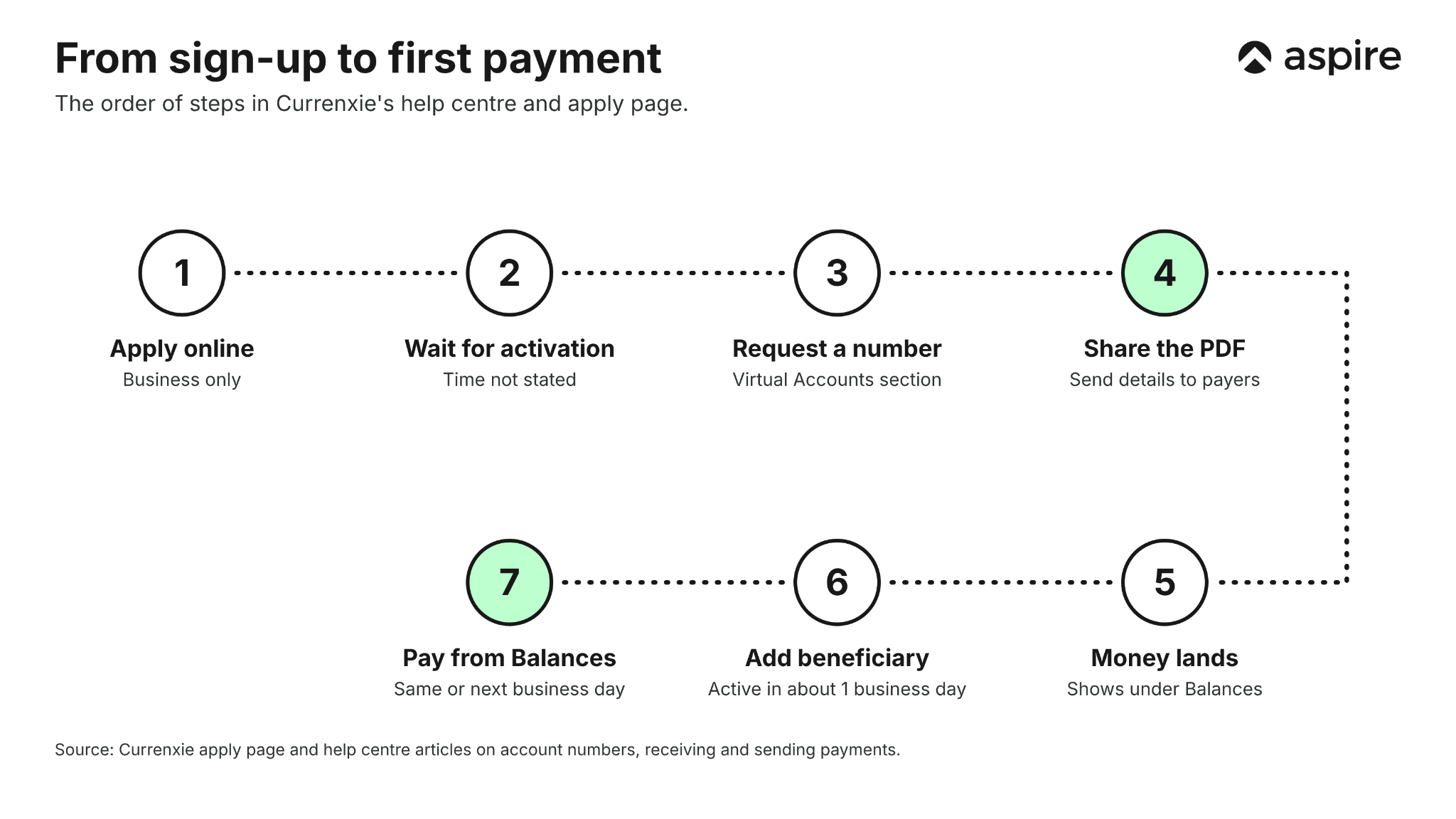
Setup takes 4 steps. Apply online, wait for activation, request account numbers in the dashboard, then share the details PDF with payers.² ³ ⁴
Sending needs an active beneficiary. Activation typically takes 1 business day, and payments usually arrive the same or next business day.⁵
Published fees are in USD. Local transfers cost USD 0.75 to receive and USD 3.00 to send, and SWIFT costs USD 8.00 each way.⁶
Several details are not published. Required documents, activation time and approval rules are not stated on the pages we checked.² ⁵
Knowing how to use Currenxie starts with 3 jobs: open the account, receive money into it and send money out. Currenxie is a multi-currency business account used to collect overseas payments and pay suppliers abroad.
This guide follows those 3 jobs in order, using Currenxie's own help centre and pricing pages. It adds a fee table, a worked example and the limits to check before you apply.
If you are still comparing providers, Aspire is a good alternative, and we note where our multi-currency business account might suit your business better.
SLUG (delete this line before upload): how-to-use-currenxie
What is Currenxie?
Currenxie is a multi-currency business account that gives a company local account details in several currencies and lets it send payments abroad. The account is called the Global Account, and it holds a separate balance for each currency.⁷
Payments land in the Global Account whichever bank account number receives them. You can then exchange a balance into another currency or send from any balance.⁷ Currenxie lists marketplace and gateway integrations such as Amazon, Shopify, Stripe and PayPal, plus Xero reconciliation.¹
Who can open a Currenxie account?
Only businesses can open a Currenxie account, and the business does not need to be incorporated in Hong Kong.² The accounts page sets out who is in and who is out.¹
| Applicant | Can apply? |
|---|---|
| eCommerce sellers, SMBs, large enterprises, marketplaces and platforms | Yes |
| Sole traders and personal accounts | No |
| US-registered businesses | Not currently onboarded |
| Businesses with American directors | Yes |
| Businesses in sanctioned or high-risk countries | No |
| Businesses in excluded activities | No, the help centre lists them |
The Currenxie Card is narrower. It is offered only to Global Account holders whose companies are registered in Hong Kong.⁸
How do you open and activate an account?
You open a Currenxie account online and request account numbers once the account is activated. The apply page gives this order.²
- Start the application from the "Apply now" link, which opens the Currenxie sign-up page.
- Complete the online form for your business.
- Wait for activation. The apply page does not state how long this takes.
- Request an account number in the dashboard once the account is active.
Prepare your company documents before you start. Our guide to documents for a business bank account lists what providers commonly ask for, although Currenxie does not publish its own list. Our own application (Aspire) is also fully online, and approval can take as little as 1 business day, which may help if timing matters.
How do you receive money?
You receive money by requesting an account number, then sharing its details with the payer. Each number has its own receiving details.⁴ The help centre gives these 3 steps.
- Request an account number. Sign in, open the "Virtual Accounts" section and submit a request.³ You get 1 number per region by default, and extra requests are reviewed individually.²
- Share the details. Download the PDF of your account details from the same section and send it to the payer.⁴
- Check Balances. The payment appears under Balances in the currency it was sent.⁷
Currenxie accepts electronic payments only, so cash and cheques are not accepted.⁴ From Balances you can exchange the money or pay a supplier. Our guide to the multi-currency account explains why holding balances matters for FX cost.
How do you send money?
You send money by adding a beneficiary, waiting for it to activate and paying from a balance.⁵ The help centre gives 4 steps.
- Collect the beneficiary's bank account details.
- Add the beneficiary to your Global Account.
- Wait for activation, which typically takes 1 business day.
- Start the payment from Balances.
Payments usually arrive the same or next business day, depending on where the recipient's bank is.⁵ Direct debit payments are not supported.⁵
Plan the beneficiary step a day ahead. A supplier added at 5 pm on a Friday will not be ready for a Monday morning payment if activation takes a full business day.
For the difference between rails, see our guide to SWIFT and local transfers. We use a local transfer network for most of our payments, which can suit suppliers abroad.
Local transfers through FPS are also free with us, so a business that pays many local suppliers may want to compare that with a per-transfer fee.
What does Currenxie cost?
Currenxie's Global Account is free to open, and fees apply per transfer and per FX conversion. The Hong Kong pricing page lists these in USD.⁶
| Item | Published fee |
|---|---|
| Global Account | Free |
| Extra virtual account | USD 8.00, paid once |
| Incoming local payment | USD 0.75 per transfer |
| Local payment sent | USD 3.00 per transfer |
| SWIFT sent or received | USD 8.00 per transfer |
| FX, major currencies including HKD, USD and CNH | From 0.35% |
| FX, USD and HKD exchanges only | 0.10% |
| Admin card | Free |
| Up to 5 team cards | HKD 50 a month, flat |
| Each extra team card | HKD 15 a month |
The page states FX rates in 5 tiers by currency, and says volume discounts exist without giving their terms.⁶ Card transactions in funded currencies are listed as free.⁶
How do you estimate your monthly cost?
Count the transfers by type, then add FX on the amount you convert. A business that receives 10 local payments and sends 5 local payments in a month pays USD 22.50 in transfer fees before FX.⁶
Our guides to foreign transaction fees and how exchange rates are calculated show what to compare across providers. FX spread is the cost that varies most, so compare it on your main currency pair, ours included.
Currenxie's published rates start from 0.35% on major currencies,⁶ while our spreads (Aspire) start from 0.18%, which may add up for a business that converts often. Starting rates are not like-for-like, so compare live quotes.
How do cards and team access work?
Currenxie cards are available to Global Account holders with a Hong Kong company, and team access is set by an admin.⁸ ¹ Both are managed from the dashboard.
How do you get a card?
Eligible accounts show a "My Card" option in the main menu.⁸ The cards page describes numberless physical cards in HKD with limits you can change in the app.⁹
The card count per account is not stated consistently. The cards page mentions 1 card per Global Account for now, while the pricing page lists team card fees.⁹ ⁶ Confirm the current limit before you plan team spend. Our guide to business cards in Hong Kong compares what else is available.
Currenxie's cards page lists 1% cashback,⁹ while our corporate card offers 1.2% unlimited cashback, which may suit a team with steady card spend.
How do you add team members?
Admins set what each member can view, access and manage, across beneficiaries, accounts and transfers.¹ Use this to keep supplier payments with 1 person and give others view-only access.
What should you check before you apply?
Check eligibility, documents, timing and approvals first, because several of these are not published. This table shows what the pages state and what to ask.
| Check | What the pages state | Ask Currenxie |
|---|---|---|
| Eligibility | Business only, no US-registered businesses | Does your structure qualify? |
| Documents | Not stated | Which documents are required? |
| Activation time | Not stated | How many days for your case? |
| Payment approvals | Not stated | Can 2 people approve a payment? |
| Receiving fees on SWIFT | USD 8.00 per transfer | Who pays intermediary charges? |
| Card limit | 1 card per account on the cards page | How many cards can you issue now? |
If your business is a sole trader or US-registered, you will need another route. Our guides to choosing a business account and multi-currency accounts in Hong Kong cover the main options. If Currenxie's limits do not fit your business, Aspire is a good alternative. You can learn how our business account might be a better fit.
How does an online store use Currenxie?
A Hong Kong online store can use Currenxie to collect in foreign currencies and pay suppliers from the same balances. This invented example shows the flow.
A Hong Kong-incorporated store sells homeware on Shopify to customers in the US and UK. It requests a USD account number and a GBP account number and shares both details PDFs with its payment gateway.
When a USD payout arrives, it sits in the USD balance. The owner adds a supplier in Shenzhen as a beneficiary on Tuesday, and the beneficiary activates by Wednesday. She then pays the supplier from the USD balance and exchanges only the amount she needs.
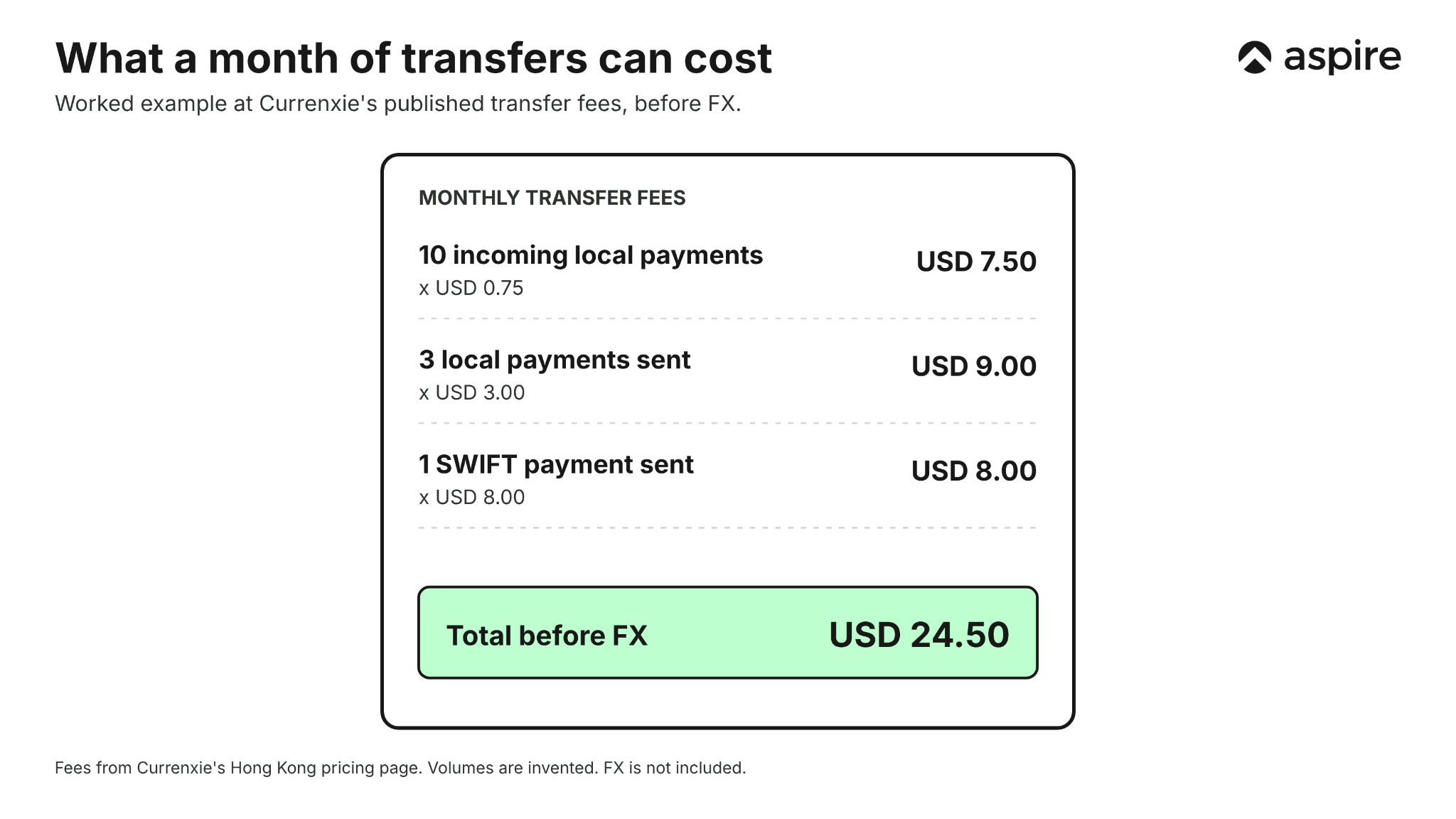
Her monthly cost for 10 incoming local payments, 3 local payments out and 1 SWIFT payment is USD 24.50 in transfer fees, before FX.⁶
Our guides to Shopify payment collection and cross-border e-commerce go further on this flow.
Why Hong Kong Businesses Choose Aspire
Opening a multi-currency account is 1 step in managing cross-border cash, and Aspire supports the accounts, cards and transfers around it.
💱 FX spreads from 0.18%, up to 3x cheaper than traditional banks. This applies across 130+ countries and 40+ currencies through Aspire's multi-currency account. It's useful for anything from paying overseas suppliers to settling international payments without losing margin to markup.
💰 1.2% unlimited cashback applies on every corporate card transaction, with no monthly cap. It kicks in automatically on eligible spend, with no minimum threshold to hit first. Over time, it quietly turns routine business spend into working capital.
🌐 Local transfer network, not multi-hop SWIFT chains, is how Aspire routes most payments. This means faster settlement and fewer intermediary fees eating into your payment before it reaches the recipient. It also reduces the chance of funds being held up for review at a correspondent bank along the way.
💸 Fixed USD 8 inbound SWIFT fee, tracked end-to-end with SWIFT GPI, applies when SWIFT is the right rail for your payment. There are no surprise deductions from correspondent banks along the way, so the amount you're quoted is the amount that arrives. You can also download payment confirmation instantly from the app, without calling the bank.
⚡ Approved in as little as 1 business day, with no branch visits and no paperwork stacks. Applications are completed entirely online, from document upload to approval. There's no waiting weeks on a relationship manager to call you back.
Open a free multi-currency business account built for Hong Kong SMEs, or explore how Aspire's corporate card fits into your day-to-day spend.
Frequently Asked Questions
Yes, if it is a business and not a sole trader. The business does not need to be incorporated in Hong Kong.² ¹
Yes for the Global Account, but the Currenxie Card is only for accounts with a Hong Kong company.² ⁸
Payments usually arrive the same or next business day, depending on the recipient's bank location.⁵
Incoming local payments cost USD 0.75 and local payments sent cost USD 3.00. SWIFT costs USD 8.00 each way.⁶
No. The help centre states that direct debit payments are not supported.⁵
No. The accounts page states that sole traders and personal accounts are not supported.¹
Sources
- Currenxie, accounts features page (issuer page, accessed November 2026)
- Currenxie, "Apply now" page (issuer page, accessed November 2026)
- Currenxie Help Centre, "How do I get a bank account number?" (issuer page, accessed November 2026)
- Currenxie Help Centre, "How do I receive payments?" (issuer page, accessed November 2026)
- Currenxie Help Centre, "How do I send payments?" (issuer page, accessed November 2026)
- Currenxie, Hong Kong pricing page (issuer page, accessed November 2026)
- Currenxie Help Centre, "What happens after I receive a payment?" (issuer page, accessed November 2026)
- Currenxie Help Centre, "Who can apply" (issuer page, accessed November 2026)
- Currenxie, cards page (issuer page, accessed November 2026)
This blog is for general information only and does not constitute financial, legal, tax, or professional advice. Aspire’s services are subject to the terms outlined in our 'Terms of Service' and 'Pricing' pages. We make no guarantees as to the accuracy, completeness, or timeliness of the content, and past results do not indicate future performance. Always consult a qualified professional before acting on any information provided.
Galih Gumelar
Writer
Galih is a seasoned writer specialising in macroeconomics, business, finance and politics. With a writing history at CNN Indonesia, The Jakarta Post, and various other reputed organisations, Galih leverages his broad range of experiences to create insightful resources for those wanting to start a business.
Aspire Launchpad
Start Your Business with Aspire Launchpad
From incorporation to venture capital, we connect you with trusted service providers to make your entrpreneurial journey seamless.

Latest articles

Guides •
How to Use Dinpay: HK Business Guide
Learn how to use Dinpay (智付) from Hong Kong, with its products, payouts, onboarding, licences and fees, and where Aspire may fit better.
Guides •
How to Use Payoneer: HK Business Guide
How to use Payoneer in Hong Kong: sign up, receive HKD, withdraw, fees and card limits, plus where we may fit better.

Expense Management •
Automated Expense Management in HK: A Practical Guide
Automate expense management in HK: the tools that help, how Aspire optimises each step, what to automate first and a worked example for a 20-person firm.
Start your journey with Aspire
Open your free account