



How to Use Payoneer: HK Business Guide

Galih Gumelar

Summary
Setup takes about 3 business days. You provide basic information, a government photo ID and a business questionnaire.² ³
You can receive HKD by local transfer. Payoneer lists HKD among its local receiving currencies.¹ ⁴
Withdrawals to a bank take 2 to 5 business days. Another Payoneer page says typically within 24 hours, so confirm your route.² ⁴
The card has no HKD. It supports USD, EUR, GBP and CAD, and activates after you receive at least USD 100.²
Fees vary by payer and route. Receiving in a local currency is free, while a card payer can cost up to 3.99% plus USD 0.49.⁵
Our account may suit HKD-first businesses better. We offer free local transfers through FPS and FX spreads from 0.18%.
Knowing how to use Payoneer comes down to 4 jobs: sign up and verify, receive money, pay or invoice clients, and withdraw to a Hong Kong bank. Payoneer is a cross-border payments platform that gives sellers and freelancers local receiving details in several currencies, including HKD.¹
This guide walks through each job with Payoneer's own help pages, then adds the published fees, the limits for Hong Kong businesses and a worked example. It also shows where our multi-currency business account may be a better fit if most of your money moves in HKD.
What is Payoneer?
Payoneer is a platform that gives a business receiving accounts in several currencies and lets it withdraw the money to a bank. It lists local bank details in 13 currencies, including HKD and USD.⁴
Clients pay by local bank transfer or SWIFT wire, and the money lands in a balance for each currency.⁴ You then hold, convert, spend or withdraw it.
Payoneer also sells a card, a mobile app, working capital advances and a checkout product.² We cover each one below, with the Hong Kong angle.
Who can open a Payoneer account?
Payoneer sets the documents by how you earn. Everyone provides a government-issued photo ID plus a business questionnaire.³
The questionnaire asks how you earn, for example through a marketplace store, your own website or a freelance profile. Have a link to the store or profile ready, plus documents describing the business.³
Hong Kong eligibility is confirmed during sign-up, and product availability depends on eligibility and jurisdiction.² Check the current terms before you apply.
How do you sign up and verify?
You sign up in the app, request receiving accounts and then verify your identity and business. Payoneer says verification takes about 3 business days.²
- Register with your email address, which becomes your username.²
- Request receiving accounts. In the app, go to Actions, then Request receiving accounts, pick currencies and submit.⁴
- Verify. Go to Settings, then Verification Center, and submit your ID and questionnaire.³
- View your account details once they are available, then share them with clients.¹
The questionnaire is a 1-time step, and approval typically takes a few minutes to 3 business days.⁴ If a platform you sell on offers Payoneer as a payout method, you can select it and sign in to your existing account.²
Meanwhile, Aspire’s own application is fully online, and approval can take as little as 1 business day. See how to compare multi-currency accounts before you choose.
How do you receive money in Hong Kong?
You receive money by sharing your local account details with the payer. A client with a Hong Kong bank account can send a domestic transfer to your HKD receiving account.¹
Payoneer offers 2 receiving types. Local receiving accounts work as if you held a bank account in the payer's country, and SWIFT receiving accounts cover places where a local account is not supported.²
- Copy the account details from your Payoneer account.
- Share them on invoices, by email or over a chat app.¹
- Wait for the payment to land in the matching currency balance.²
Receiving details cannot be charged, so a payer cannot pull money from them, and you can check payment status on the web or in the app.² For marketplaces, you link the payout to your Payoneer details instead.
Our guides to Amazon Seller Central and the Amazon payment service provider program cover the marketplace side. If you also take card payments, our guides to PayPal and Stripe explain those routes.
What does a SWIFT payment cost you?
Intermediary banks may charge their own fees on a SWIFT payment, and Payoneer says these typically run USD 20 to 30.⁴ A local transfer avoids that step.
Our guide to SWIFT and local transfers explains why. On our side, inbound SWIFT carries a fixed USD 8 fee.
How do you send a payment?
You send a payment from the web or app by entering the recipient's email. Payoneer says recipients usually receive funds within 2 hours, which is a typical timeframe, not a guarantee.²
- Select Pay, then Make a Payment.
- Enter the recipient's email, choose a payment method, add the amount and a description.
- Select Pay Now. Both sides can track the status.²
This route pays by email address. For a supplier or contractor in Hong Kong who banks locally, a direct bank transfer is often simpler.
Aspire send HKD to Hong Kong banks through FPS at no charge, so a local supplier needs no extra account. Our cross-border payments guide shows the options for overseas payees.
How do you request a payment?
You request a payment by sending the client an invoice from your account. Enter the client's details and amount, then attach or create the invoice and submit it.²
The client is notified and can pay by credit card or bank transfer. You are notified when they pay, and the funds are then available to withdraw or use.²
A card-paying client brings the higher fee on the pricing page, so ask whether a bank transfer works.⁵
How do you withdraw to a Hong Kong bank?
You withdraw by moving a balance to a bank account, and Payoneer's guide says this takes 2 to 5 business days.² Another Payoneer page says local bank withdrawals typically take within 24 hours, so the timing depends on your route.⁴
- Sign in and open the Withdraw tab.
- Select To Bank Account and enter your bank details.
- Review, confirm and select Withdraw. You get a confirmation with the details.²
Conversion is not automatic, so you convert a balance yourself before you withdraw in another currency.⁴
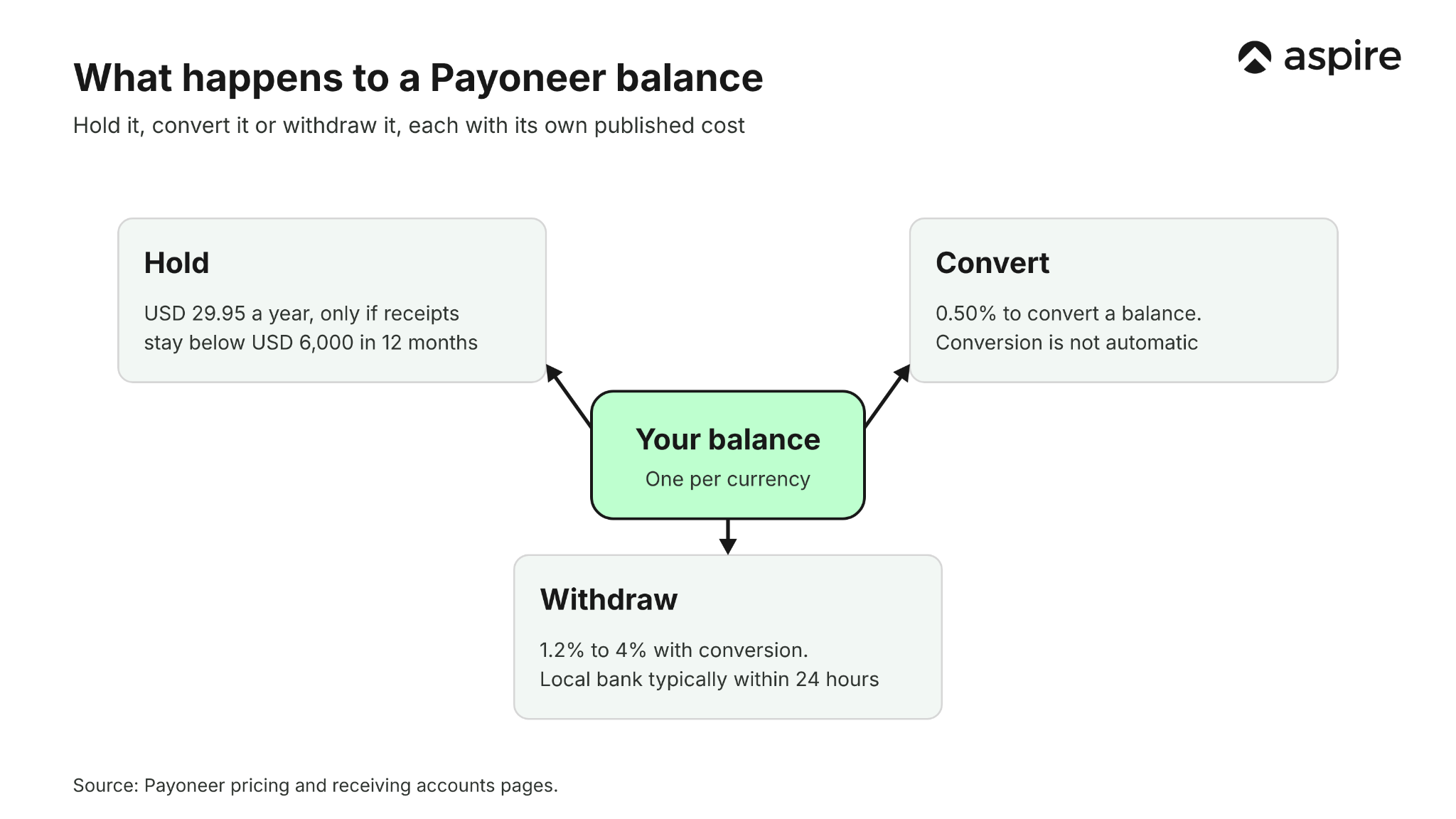
The pricing page gives a range of 1.2% to 4% for withdrawals with conversion, and 0.50% to convert a balance.⁵ It does not name a fee for a withdrawal to a Hong Kong bank, so confirm your own rate in the app before you move money.
What does Payoneer cost a Hong Kong seller?
Receiving in a local currency is free, and the fee rises for other payer methods. Non-local receiving costs 1% (minimum USD 1), and a card payer can cost up to 3.99% plus USD 0.49.⁵
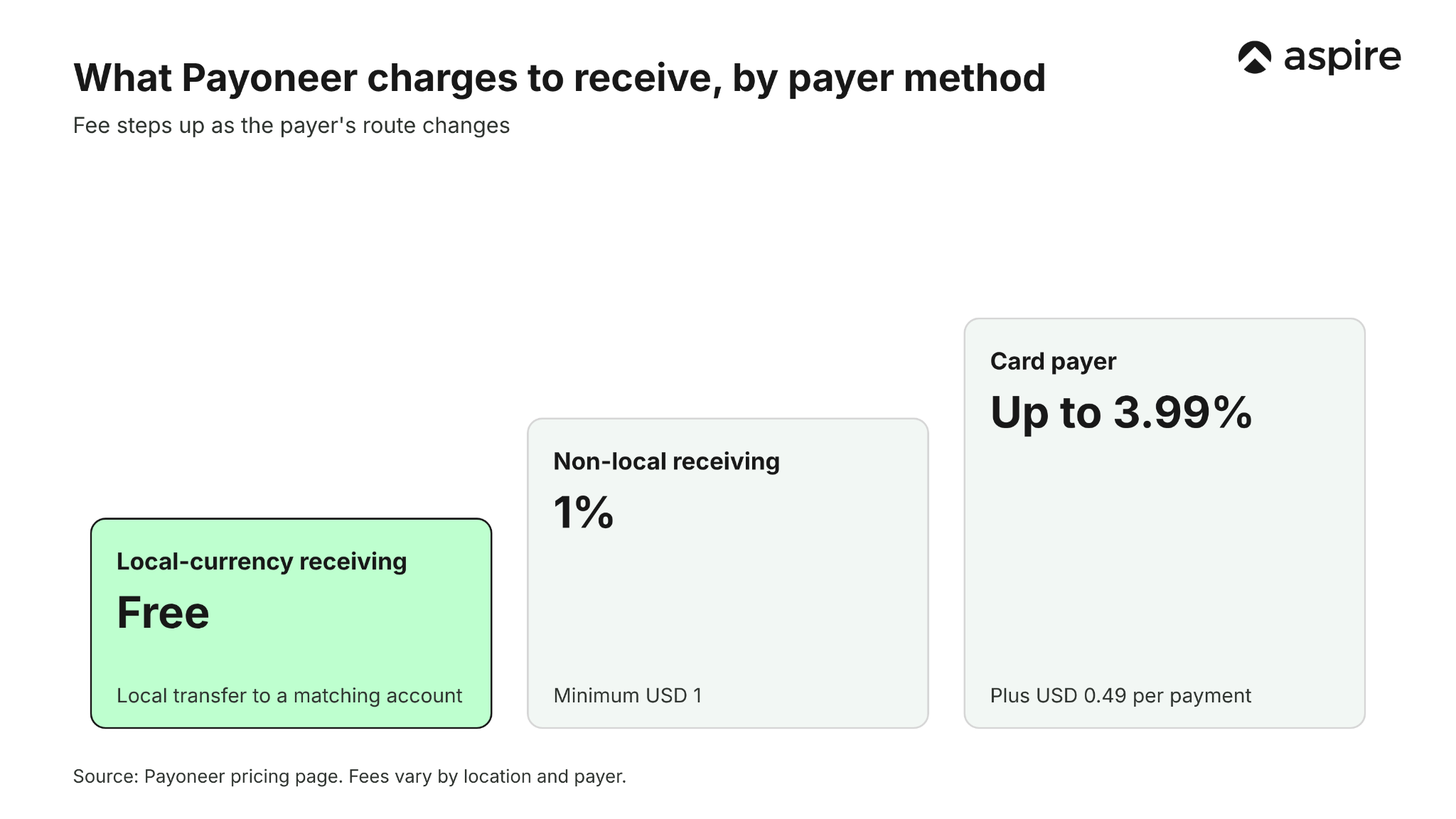
The fee schedule is global and varies by location, so it is not specific to Hong Kong. These are the other main fees on the pricing page.⁵
| Fee | Published amount |
|---|---|
| Annual account fee | USD 29.95, only if receipts stay below USD 6,000 in 12 consecutive months |
| Payoneer card, annual | USD 29.95 |
| Additional virtual cards | Free |
| Converting a balance | 0.50% |
| Withdrawal with conversion | 1.2% to 4% |
| Intermediary bank charges | Typically USD 20 to 30, outside Payoneer's control⁴ |
Our guides to foreign transaction fees and how exchange rates are calculated show what else to compare, since the spread is often the bigger cost.
How does the Payoneer card work?
The Payoneer card is a Mastercard linked to your Payoneer balance, available as a virtual or physical card. It works anywhere Mastercard is accepted, including ATMs, stores and online.²
It supports 4 currencies: USD, EUR, GBP and CAD, so there is no HKD card.² A Hong Kong business that spends in HKD pays a conversion each time it tops up or spends.
You must receive at least USD 100 or the equivalent before the card activates.² For more currencies, the page suggests a separate card for each.² The annual fee is USD 29.95.⁵
Aspire corporate card pays 1.2% unlimited cashback with no monthly cap, and our Multi-Currency Card transacts in 13 local currencies. You can issue multiple virtual cards at no extra cost, and our corporate card guide shows the controls.
What else does Payoneer offer?
Payoneer adds a mobile app, working capital and a checkout product on top of the account. Each suits a different kind of seller.
- Mobile app. On iOS and Android, you can send and request payments, withdraw, view balances and manage cards.²
- Working capital. Offers go to eligible Amazon and Walmart sellers and small businesses receiving USD, for a single fixed fee settled from future earnings. The page states no fee amount.²
- Checkout. Merchants accept online card payments on their webstore, with integrations for Shopify, WooCommerce, Shoplazza, Shopline and Ueeshop.²
Our guide to payment gateways and Shopify payment collection compare the checkout options.
How does Payoneer compare with Aspire?
Payoneer centres on receiving from overseas marketplaces and clients, and our account may be a better fit when you also run your day-to-day HKD finances. This table sets the published Payoneer details beside ours.
| Check | Payoneer (published) | Ours |
|---|---|---|
| HKD local receiving | Yes, HKD receiving account¹ | Yes, HKD account with local transfers |
| Local HKD transfers out | Not stated | Free through FPS |
| FX | 0.50% balance conversion; 1.2% to 4% on withdrawals with conversion⁵ | FX spreads from 0.18% |
| Inbound SWIFT | Intermediary fees typically USD 20 to 30⁴ | Fixed USD 8 |
| Approval | About 3 business days² | As little as 1 business day |
| Card currencies | USD, EUR, GBP, CAD² | Multi-Currency Card in 13 local currencies |
| Cashback | Not stated | 1.2% unlimited on corporate card |
| Payroll, MPF, contractors | Not stated | From 1 account |
Aspire is a better fit if you pay Hong Kong suppliers, staff and MPF in HKD, because we keep those transfers local and free. We may also suit you better if FX cost matters, since our spreads start from 0.18% against a 1.2% to 4% range for Payoneer withdrawals with conversion.
Payoneer can still help if you need marketplace payouts or working capital for Amazon and Walmart. Some sellers use both, receiving with Payoneer and running operations from our business account.
Why Hong Kong Businesses Choose Aspire
Collecting marketplace and client payments is 1 part of running a cross-border business, and Aspire supports the accounts, cards and transfers around it.
💱 FX spreads from 0.18%, up to 3x cheaper than traditional banks. This applies across 130+ countries and 40+ currencies through Aspire's multi-currency account. It's useful for anything from paying overseas suppliers to settling international payments without losing margin to markup.
💰 1.2% unlimited cashback applies on every corporate card transaction, with no monthly cap. It kicks in automatically on eligible spend, with no minimum threshold to hit first. Over time, it quietly turns routine business spend into working capital.
🌐 Local transfer network, not multi-hop SWIFT chains, is how Aspire routes most payments. This means faster settlement and fewer intermediary fees eating into your payment before it reaches the recipient. It also reduces the chance of funds being held up for review at a correspondent bank along the way.
💸 Fixed USD 8 inbound SWIFT fee, tracked end-to-end with SWIFT GPI, applies when SWIFT is the right rail for your payment. There are no surprise deductions from correspondent banks along the way, so the amount you're quoted is the amount that arrives. You can also download payment confirmation instantly from the app, without calling the bank.
⚡ Approved in as little as 1 business day, with no branch visits and no paperwork stacks. Applications are completed entirely online, from document upload to approval. There's no waiting weeks on a relationship manager to call you back.
Open a free multi-currency business account built for Hong Kong SMEs, or explore how Aspire's corporate card fits into your day-to-day spend.
Frequently Asked Questions
Receiving in a local currency is free. An annual USD 29.95 account fee applies only if receipts stay below USD 6,000 in 12 consecutive months.⁵
About 3 business days, according to Payoneer's guide.² Another page says typically a few minutes to 3 business days.⁴
Yes. Payoneer lists HKD among its local receiving currencies.¹
The guide says 2 to 5 business days.² Another page says typically within 24 hours for local bank withdrawals.⁴
No. The Payoneer card supports USD, EUR, GBP and CAD.²
No. Auto-conversion is not supported, so you convert balances manually.⁴
For HKD-first businesses, it may be. We offer free local transfers through FPS, FX spreads from 0.18% and approval in as little as 1 business day.
Sources
- Payoneer, Managing your Hong Kong business with Payoneer local receiving accounts (issuer page, accessed November 2026)
- Payoneer, How to use Payoneer guide (issuer page, accessed November 2026)
- Payoneer, How to submit your required documents to use the Global Payment Service (issuer page, accessed November 2026)
- Payoneer, Receiving Accounts (issuer page, accessed November 2026)
- Payoneer, pricing page (issuer page, accessed November 2026)
This blog is for general information only and does not constitute financial, legal, tax, or professional advice. Aspire’s services are subject to the terms outlined in our 'Terms of Service' and 'Pricing' pages. We make no guarantees as to the accuracy, completeness, or timeliness of the content, and past results do not indicate future performance. Always consult a qualified professional before acting on any information provided.
Galih Gumelar
Writer
Galih is a seasoned writer specialising in macroeconomics, business, finance and politics. With a writing history at CNN Indonesia, The Jakarta Post, and various other reputed organisations, Galih leverages his broad range of experiences to create insightful resources for those wanting to start a business.
Aspire Launchpad
Start Your Business with Aspire Launchpad
From incorporation to venture capital, we connect you with trusted service providers to make your entrpreneurial journey seamless.

Latest articles

Guides •
How to Use Dinpay: HK Business Guide
Learn how to use Dinpay (智付) from Hong Kong, with its products, payouts, onboarding, licences and fees, and where Aspire may fit better.

Expense Management •
Automated Expense Management in HK: A Practical Guide
Automate expense management in HK: the tools that help, how Aspire optimises each step, what to automate first and a worked example for a 20-person firm.

Guides •
How to Use Currenxie: HK Business Guide
How to use Currenxie as a Hong Kong business: who can apply, how to receive and send money, published fees, cards and limits to check first.
Start your journey with Aspire
Open your free account