


What is expense report management
It is basically an end-to-end process that a business uses to record, review, approve, reimburse, and store every expense an employee incurs on the company’s behalf. This can include a conference sponsorship, business travel and accommodation, flights, meals, office supplies, or software subscriptions. While an expense report simply records a specific business expense or set of expenses, expense report management is a broader system around those transactions.
An employee expense report management helps businesses:
- Provide real-time visibility into where money is going to finance leaders
- Keep spending within budget and policy
- Get employees reimbursed accurately and on time
- Create a clean, defensible paper trail for tax filing, audits, and compliance
What is an expense report
An expense report is a document, physical or digital, that lists all the business expenses made by employees on behalf of the company. For example, if an employee travels for a business meeting, their expense report may include flight tickets, hotel stays, meals, taxi fares, and other related expenses. There are also several types of expense report templates that you can use. A business expense report usually contains:
- Employee name, department, and cost centre code
- Date of each expense
- Merchant or vendor name
- Amount and currency
- Expense category, such as travel, meals, lodging, and software
- Business purpose
- Attached receipt or invoice
Types of expense report
Depending on the nature of employee expenses, the mode of payment, and how finance teams need to track them, founders use different types of expense reports. Different expense reports have different formats, but the goal is usually the same, which is to document business expenses, support approvals, and ensure correct reimbursement or accounting. Here are the varied types of expense reports you can use:
1. Business expense reports: This covers routine work-related purchases that employees make on behalf of the company, such as office supplies, software, equipment, professional services, and other approved company spends.
2. Travel expense report: If you went on any business trips, those costs, including flights, hotels, meals, taxis, and rental cars, are tracked through this type of report. It may also include expenses related to business events or conferences.
3. Project or client expense report: You can use this report when you need to allocate expenses to a specific project, client, or business activity. This enables you to understand the actual price of delivering a certain project or serving a particular client.
4. Mileage expense report: This is used when employees use their personal vehicle for business work. The report includes information, including travel dates, destinations, distance travelled, and the applicable reimbursement rate.
5. Corporate card expense report: All transactions that happen using a company-issued card are documented in this report. Also, employees are required to provide receipts and business purposes for every transaction, even though they didn’t pay out of pocket.
6. Employee reimbursement report: This report is used when employees pay for eligible business expenses using their personal funds and require the company to reimburse them. These expenses may include anything from business meals and transportation to work-related purchases.
Why is expense report management essential for founders
Expense reporting acts as a bridge between your employee experience and finance operations. If the process is poorly designed, both sides face the brunt. Employees might face delayed reimbursements, complicated submission processes, and unclear policies, while founders may deal with manual data entry, missing receipts, and duplicate claims. Plus, for founders, the consequences go beyond administrative inconvenience. That's why expense report management matters.
1. Spend visibility and forecasting
With a centralised system in place, leaders gain insight into where money is going across departments, projects, employees, and spending categories. So, instead of waiting for month-end reporting, finance leaders can identify spending trends earlier and make more informed decisions.
2. Budget control
Finance leaders can compare actual spend against budget in real time, rather than discovering an overspend weeks after it happened. An expense management report helps you see who can spend, how much they can spend, what they can spend on, which expenses require approval, and what documentation is needed.
3. Cash flow management
When expenses are submitted late or processed manually, finance teams have limited visibility into upcoming reimbursement needs. With expense report management, firms can capture expenses more quickly and consistently, making liabilities easier to track and forecast.
4. Employee experience and retention
One of the major reasons for employee dissatisfaction is slow reimbursements. Expense report management can help companies tackle a weeks-long reimbursement cycle and retain employees.
5. Tax and regulatory compliance
A well-documented expense report makes it easier for organisations to claim eligible tax deductions, respond to audits, and showcase that spending was legitimate and business-related.
6. Error and fraud prevention
According to ACFE’s Occupational Fraud 2026: A Report to the Nations, companies lose an estimated 5% of annual revenue to fraud, with a median loss of $104,000 per case and an average loss of $1.46 million. A structured expense report management, with itemised receipts, layered approvals, and a full audit trail, remains an effective fraud deterrent for businesses. Automated controls can help finance teams identify unusual activity earlier.
The complete expense report management lifecycle
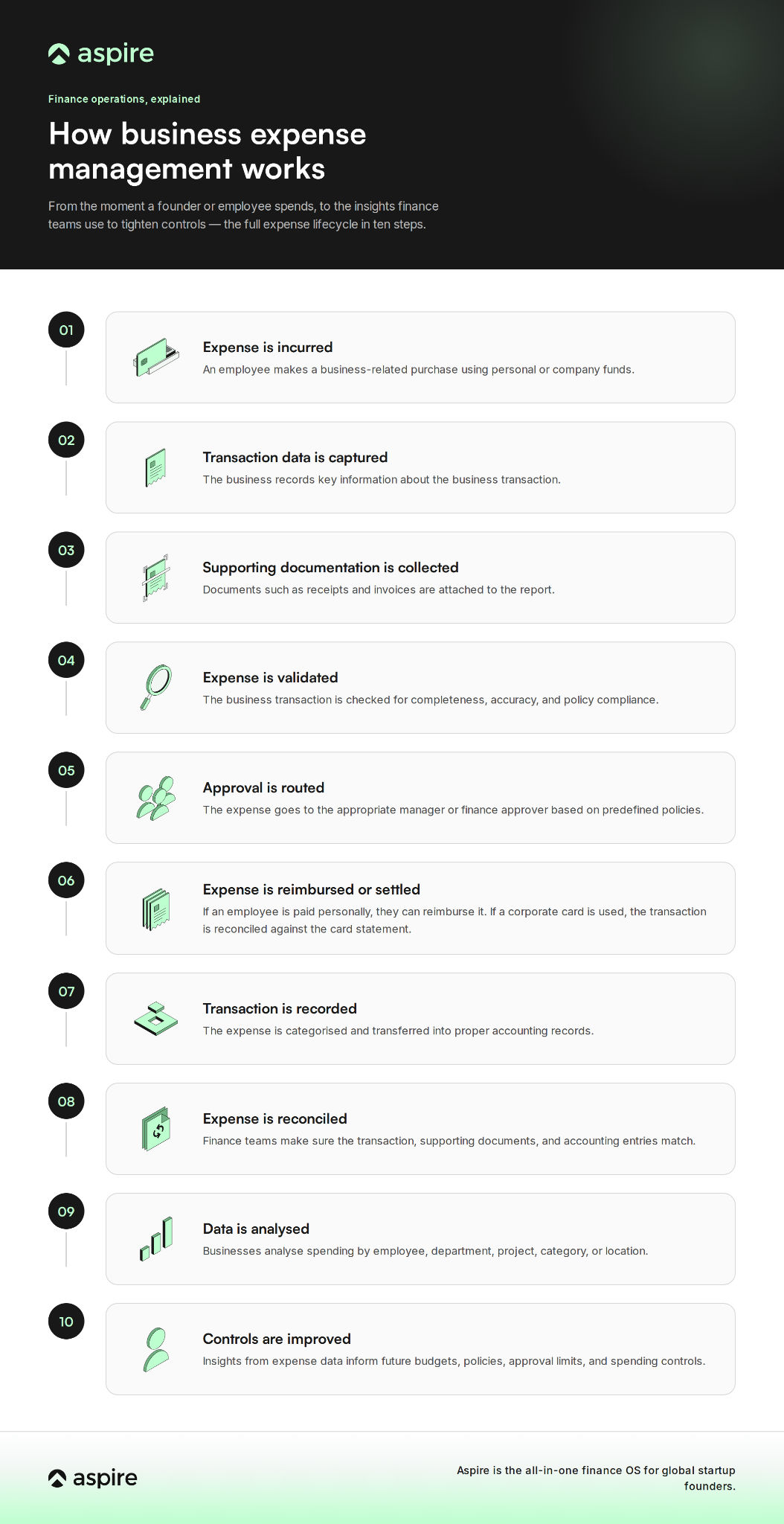
An effective expense report management process goes beyond submitting a report. The infographic below showcases the complete lifecycle of a business expense report.
Processing an expense report
From a finance perspective, processing an expense report usually follows five steps:
1. Submission: The employee submits the expense report with receipts and expense details
2. Manager review: The manager checks that the transaction is business-related and policy-compliant, then approves or rejects it
3. Finance review: Next, the finance team verifies amounts against receipts, checks tax treatment, and confirms the right expense category
4. Reimbursement or card reconciliation: Out-of-pocket expense is repaid to the employees, while business card spend is matched against the statement
5. Recordkeeping: The report and receipts are archived for audit, tax, and compliance purposes
Building an effective expense report policy
An expense report policy clearly states how employees must spend company money and how those expenses are handled. A strong policy usually covers:
- Eligible expense categories like travel, meals, software, and so on
- Submission deadlines state that most business expenses must be submitted within 30 days of being incurred
- Approval hierarchy of who approves what, and at what dollar threshold does a second approver get involved
- Receipt requirements, including exceptions (example, mileage claims that don’t need fuel receipts)
- Non-reimbursable items
- Consequences for policy violations, from delayed reimbursement to disciplinary action for fraudulent claims
As a business owner, you must also understand that a policy is only as effective as the company’s ability to enforce it. A document might say employees cannot exceed a certain limit, but if finance discovers the violation weeks later, then the policy is functioning as a retrospective check rather than a spending control. That is why automation becomes valuable.
Expense report audit best practices
Even if you have a strong policy in place, regular audits catch what day-to-day approvals might miss. As a business owner, make sure you follow the expense report audit best practices, which include:
1. Sample-based spot checks: Besides reviewing high-value claims, ensure to randomly audit a percentage of expense reports every month. This enables you to identify recurring issues or policy violations across all expense types.
2. Spending trend analysis: Regularly analyse expense data to identify unusual patterns, such as claims that consistently fall just below approval thresholds, frequent expenses from the same employee, or sudden increase in spending. These trends indicate attempts to bypass approval rules and highlight areas where policies need to be specified more clearly.
3. Duplicate claim detection: Ensure to look for any duplicate submissions by comparing receipt numbers, transaction dates, vendors, and expense amounts. This helps you prevent any duplicate reimbursements and highlight potentially fraudulent claims.
4. Vendor and merchant verification: When you onboard vendors, cross-check whether their business is legitimate and that the expenses align with the employee’s role and business activities.
5. Complete audit trails: Do keep a check on every expense report and that it includes a clear record of who submitted, reviewed, approved, modified, and reimbursed the claim, along with timestamps.
6. Expense report policy checks: Because business needs, tax regulations, and travel costs change over time, ensure to revisit your expense report policy at least once a year. Also, communicate any updates to employees and provide refresher training to ensure everyone understands the latest policies and compliance needs.
Common challenges of expense report management
Managing expenses manually becomes an uphill task for businesses as they grow and expand. And it becomes even harder to manage as transaction volumes increase, making automation an important part of a scalable expense management strategy. A few common challenges that they usually face include:
1. Missing receipts: Employees may often forget to submit receipts or lose them, creating extra work for the finance team.
2. Manual data entry: It takes hours for finance teams to transfer information from receipts and spreadsheets into accounting systems.
3. Slow approvals: When waiting for managers' approvals, expenses can get stuck for a long time.
4. Policy violations: This usually occurs when employees accidentally or intentionally submit expenses that don’t meet company policies.
5. Duplicate claims: If the same expense is submitted more than once or claimed for reimbursement after being paid with a business card, this challenge comes up.
6. Limited visibility: When data is spread across Excel sheets, emails, and different payment systems, getting a real-time view of company expenses becomes difficult.
How to automate expense reports
Reduction in manual entry, faster approvals, improved policy compliance, and greater visibility – this is what founders get when they opt for automation. Rather than relying on employees and finance teams to manually move information between receipts, spreadsheets, and accounting systems, firms can automate key steps in the complete expense reporting process. The key is to automate the repetitive steps while keeping human oversight for high-value, unusual, or potentially fraudulent transactions.
1. Digitise receipt collection: With mobile apps and online platforms, employees can easily capture receipts digitally. OCR extracts information such as the vendor, date, amount, and currency, reducing manual data entry.
2. Automate expense categorisation: Based on predefined rules or historical spending patterns, expense management software automatically categorises transactions. After this, finance teams can review exceptions instead of manually categorising every transaction.
3. Automate policy checks: Businesses can set rules for spending limits, expense categories, receipt requirements, and approval thresholds in the system. The system then automatically highlights expenses that don’t meet these criteria for further review.
4. Digitise approval workflows: Rather than manually emailing managers, expenses can be routed to the right approvers based on factors such as employee, department, amount, or cost centre.
5. Connect corporate cards and expenses: Business card transactions can be matched with receipts and expense submissions. This helps organisations identify missing documentation and reduce duplicate reimbursement claims.
Expense report fraud and prevention
According to ACFE’s 2026 Report to the Nations, fraud impacts companies of every size. In fact, smaller businesses currently carry the highest median losses of any company size bracket. The major reason for the occurrence of expense report fraud is when employees intentionally misrepresent business transactions to receive money or benefits that they aren’t entitled to. Typical frauds include:
- Claims that fall under approval or receipt thresholds
- Submitting personal expenses
- Creating fictitious expenses
- Altering receipts
- Claiming the same expense multiple times
- Submitting a business card purchase for reimbursement
With a strong expense report management process in place, you can identify these issues and flag them to the finance teams for proper investigation.
Expense report software for small business: Things to look for
An expense report management software is not just for big enterprises but also for lean finance teams that don’t have the time and resources for manual processing. When selecting employee expense report management software for small business, ensure to keep an eye out for:
- Mobile receipt capture with OCR for employees to quickly take a snap and submit in minutes
- Configurable approval workflows that match your firm’s structure without requiring an IT team to set up
- Real-time budget and expense visibility at team, company, and project level
- Business card issuance for expense to be captured automatically
- Accounting software integrations to avoid duplicate data entry
- Multi-currency support for your team that travels internationally
Expense report management in Singapore
For firms looking for expense report management Singapore, expense processes must account for both internal controls and local tax documentation needs. Businesses in Singapore need to ensure that they comply with the Inland Revenue Authority of Singapore (IRAS) or a qualified tax advisor. There are also a few more considerations that companies in the country must adhere to when opting for expense report management. These include:
- GST-related documentation: Firms must correctly identify which expenses carry claimable input GST, and expense reports should capture this at the point of entry instead of rushed quarter-end reconciliation.
- IRAS documentation needs: Singapore’s tax authority requires you to provide supporting documentation for claimed business expenses.
- Multi-entity and regional operations: Many organisations in Singapore run their operations or teams across Southeast Asia. Therefore, expense reports frequently involve multiple currencies and cross-border reimbursements.
- Quick digital adoption: Small businesses in Singapore are becoming digital. According to IMDA’s Singapore Digital Economy Report 2025, 95.1% of Singapore businesses have adopted at least one digital solution by 2024. Plus, businesses that have adopted AI-enabled solutions under the Singapore government’s Productivity Solutions Grant (PSG) have reported an average cost savings of around 52% in 2024.
SMEs that adopted AI-enabled solutions under Singapore's Productivity Solutions Grant (PSG) reported average cost savings of 52% in 2024.
Best expense management software
The best expense management software depends on your business size, spending patterns, and finance workflows. Some platforms are designed for startups and small businesses, while others are fit for larger organisations with complex approval structures. Below we’ve listed some of the best expense management software.
[Table:1]
Conclusion
Finance, compliance, and employee experience — at the intersection of them sits an expense report management system. The foundation of any business is built with clearly laid out policies, proper receipt collection, multiple approvals, and regular audits. Hence, the need for strong expense report management. It helps businesses like yours gain more control over business transactions, reduce manual work, and make more informed decisions.
If you’re looking to digitise your business, Aspire’s expense management solution lets you streamline claims, gain stronger spend controls, and provide your employees with unlimited corporate cards. Aspire helps you simplify expense report management while maintaining greater control over company finances. This enables you to spend less time on administration and more time driving smarter financial decisions.
FAQs
1. How to prepare an expense report?
Start by recording each business-related transaction with details such as the date, vendor, amount, expense category, and business purpose. Also, attach the required receipts or supporting documents, review the report for accuracy, and submit it for approval according to your firm’s expense policy.
2. How do you process an expense report?
The process involves reviewing the submitted expenses for accuracy, verifying expense report receipts, checking expense report compliance with company policies, and gaining necessary approvals. After the approval, expenses are reimbursed and stored for future audits and financial reporting.
3. What is the best way to keep track of expenses?
You can do this by using expense report management software that captures receipts digitally, automates expense reporting, and provides real-time visibility into business spending.
4. What is the best expense reporting tool?
It completely depends on your business size and needs. A few good expense report management solutions include Aspire, Expensify, and Brex.
5. How is expense report management different in Singapore?
Businesses in Singapore must account for GST treatment on claimable expenses, IRAS documentation needs, and for firms operating regionally.





.webp)