


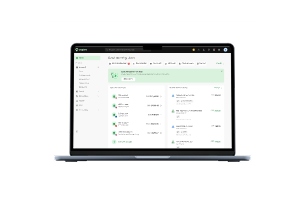
MYOB at a glance
[Table:1]
Our MYOB review: MYOB is one of the stronger options for an Australian business that needs serious payroll, inventory or job-management functionality. It's harder to justify if you're a sole trader or small service business that mainly needs invoices, expenses and bank reconciliation.
MYOB pricing in 2026
The headline promotional price isn't the number you should use to budget. Look at the standard price, required add-ons and features you'll actually use.
[Table:2]
These are MYOB's current advertised Australian prices at the time of writing. Promotional offers have eligibility and expiry conditions, so check the live pricing page before purchasing.
What does MYOB actually cost?
The subscription is only part of the calculation. Business Lite and Pro charge $3 per employee per month for payroll. Lite supports up to two employees, while Pro supports unlimited employees. AccountRight Plus and Premier include unlimited payroll.
Inventory can also add to the bill. MYOB currently lists unlimited inventory as a $22/month add-on for Lite and Pro. That changes how you should compare the plans.
Which MYOB plan should you choose?
Choose based on what you're doing now and what you'll need soon.
[Table:3]
Choose Solo if you want simplicity
Solo is MYOB's mobile app for sole traders. It focuses on admin, banking, payments, invoicing, expenses and tax-related tasks. MYOB currently advertises unlimited quotes and invoices, automated GST and tax tracking, and Tap to Pay functionality.
Solo makes sense when your accounting needs are straightforward.
If you're mainly sending invoices, recording expenses and keeping your tax records organised, paying for a more comprehensive accounting platform may add complexity without giving you much extra value.
Choose Business Lite if you need fuller accounting
Lite is aimed at sole traders and small businesses with up to two employees.
It adds GST tracking and BAS lodgement, inventory and orders, job tracking, expense management and optional payroll. MYOB says Lite is fully web-based and connects up to two existing bank accounts.
Choose Business Pro if you're growing
Pro is aimed at small to medium businesses with multiple employees.
It adds unlimited connected bank accounts, sales orders, advanced reporting and analytics, budgets and jobs. Payroll remains an additional $3 per employee per month.
Choose AccountRight Plus if operations are getting complex
Plus is aimed at established businesses and includes unlimited payroll, unlimited inventory and priority support. MYOB also lists timesheets, rosters and broader accounting capabilities at this level. This is the point where MYOB's depth becomes a genuine advantage. But don't upgrade simply because Plus has more features.
Choose AccountRight Premier if you need multi-currency
Premier includes the benefits of Plus and adds multi-currency, another business and more advanced inventory capabilities, including multiple warehouse locations. If you don't need those features, Premier is difficult to justify.
Is MYOB easy to use?
There's no single answer because the experience changes significantly between products.
Solo: simplest
Solo has a narrower feature set and is designed around a mobile workflow. That's an advantage if you don't need a full accounting system.
MYOB Business: accessible, but broader
The MYOB Lite and Pro are web-based, which removes the desktop setup associated with AccountRight. They still provide considerably more functionality than Solo.
AccountRight: more capable, more involved
AccountRight gives you deeper functionality, but you're dealing with a more complex accounting environment and desktop considerations.
That leads to a simple rule:
The more accounting complexity you ask MYOB to handle, the more time you'll need to spend learning the platform.
That's not necessarily a weakness. If you need the functionality, the extra complexity can be worthwhile.
Usability verdict: 8/10 overall, with a much simpler experience on Solo than AccountRight.
What features does MYOB include?
[Table:4]
MYOB's current app marketplace lists more than 350 apps and integrations.
AI features in MYOB
AI is becoming a more visible part of MYOB in 2026.
MYOB currently promotes:
- AI Business Insights, which provides observations about costs, spending, income and cash management
- Smart Reconciliation, which automatically matches transactions
- Smart Invoice Reminders, which helps automate payment follow-ups
- AI BAS, which helps prepare BAS information and flags transactions for review
MYOB says AI Business Insights and Smart Reconciliation are currently in beta, while Smart Invoice Reminders is live. AI BAS was introduced by MYOB in 2026 as an AI-supported BAS preparation tool, initially available to sole traders.
What's changed in MYOB in 2026?
If you're researching MYOB in 2026, these changes matter.
AI is moving into everyday workflows
MYOB has rolled out AI-assisted BAS preparation, business insights, reconciliation and invoice reminders.
This is more meaningful than simply adding an AI chatbot. The tools are being built into accounting workflows such as reconciliation, cash-flow analysis and BAS preparation.
AccountRight offline mode has ended
From 17 June 2026, AccountRight PC Edition stopped supporting offline company files. Online files continue to work through AccountRight PC Edition or the browser. MYOB says the change is driven by the older technology used by offline mode.
For a new customer, this isn't necessarily a reason to avoid AccountRight. If you are an existing customer running older offline files, it is a significant change and worth checking before migrating.
Australian card surcharging is changing
MYOB currently charges $0.25 + 1.8% for online payments, including GST. Tap to Pay currently costs $0.30 + 1.6% per transaction. However, from 1 October 2026, Australia's new card-payment rules will remove surcharges for EFTPOS, Mastercard and Visa.
That matters if you currently pass payment fees on to customers.
You can still use MYOB's payment functionality, but don't build your long-term pricing model around being able to pass these fees through to customers.
MYOB payment fees
MYOB's current online payment fee is $0.25 per transaction plus 1.8% of the payment value, including GST. Tap to Pay is currently $0.30 per transaction plus 1.6% of the invoice value, including GST.
There are also potential fees for events such as chargebacks on Tap to Pay. MYOB currently lists a $33 chargeback fee. Treat payment fees as a business cost, not something you can assume customers will always cover.
Where MYOB falls short
MYOB's depth is useful when you need it. But that depth can also create extra cost, setup and complexity.
1. The more capable plans take more work to manage
Solo is deliberately narrow in its feature set. You can invoice, track expenses, manage payments and handle basic tax administration from the mobile app.
AccountRight is a different proposition. It adds advanced inventory, payroll, job tracking, timesheets, rosters and more detailed reporting. That gives you more control, but it also means more settings, workflows and accounting processes to manage.
If you're a simple service business, you may not benefit from that extra complexity. If you're managing employees, stock and jobs, you probably will.
2. The advertised price isn't necessarily your operating cost
The introductory prices are easy to notice. The add-ons are easier to miss.
For example, Business Pro is currently advertised at $21/month for the introductory period, then $70/month. Payroll adds $3 per employee per month, so a business with 10 employees would pay $100/month at the standard Pro price before other optional costs. Unlimited inventory adds another $22/month on Lite and Pro.
That's why you should price MYOB against their actual setup, not the promotional headline.
3. AccountRight's move away from offline files matters if you're an existing user
From 17 June 2026, AccountRight PC Edition stopped supporting offline company files. Online files continue to work through AccountRight PC Edition or the browser.
For a new MYOB customer, that's unlikely to be a deciding factor. If you’re running an older AccountRight setup with locally stored company files, it is. Before moving, check how your existing files, access, backups and accounting workflow will work online.
4. You can end up paying for functionality you don't use
If you send a handful of invoices each month, record expenses and need basic GST tracking, you don't necessarily need advanced inventory, job management or AccountRight's deeper reporting. In that situation, MYOB's additional functionality isn't a benefit. It's something you're paying for without using.
What do MYOB customers say?
ProductReview currently lists MYOB review at 3.5/5 from 3,522 reviews, with 71% positive and 25% negative reviews shown in its current overview. Recent negative reviews frequently mention customer-service wait times, support problems, pricing and cancellation.
If your business is comfortable managing accounting software without much support, this may matter less. If payroll, BAS or accounting access is mission-critical, support quality deserves more weight in your decision.
Verdict: Is MYOB worth it in 2026?
MYOB’s value comes from giving Australian businesses a path from straightforward bookkeeping into payroll, inventory, jobs and more advanced accounting.
For businesses dealing with international payments, Aspire can fill some of the gaps that accounting software like MYOB isn’t designed to address. While MYOB can record transactions and support accounting across multiple currencies, Aspire is focused on the financial operations behind those transactions.
You can use it to manage multi-currency accounts*, hold foreign currencies, make international payments and receive overseas transfers, giving you more control over how money moves across borders. This can be particularly useful if you pay overseas suppliers, collect payments from international customers or need to manage FX costs alongside their MYOB accounting workflows.
Frequently asked questions
How much does MYOB cost after the introductory period?
Current standard prices after promotional offers are $99/year for Solo, $315/year for Business Lite, $70/month for Business Pro, $165/month for AccountRight Plus and $210/month for Premier.
What is the cheapest MYOB plan?
Solo is currently the cheapest MYOB accounting plan, advertised at $12 for the first 12 months and $99/year after the offer period.
What is the difference between MYOB Solo and MYOB Business?
Solo is a mobile-first product for sole traders. MYOB Business provides broader accounting functionality, including GST/BAS, inventory, payroll and job tracking depending on the plan.
Is MYOB better than Xero?
Neither is universally better. MYOB is particularly compelling if you need its Australian accounting, payroll, inventory and job-management functionality. Xero is worth comparing if its cloud workflow or ecosystem better fits your business.
Is MYOB better than Xero or QuickBooks?
There’s no single winner between MYOB, Xero and QuickBooks. MYOB can be the stronger choice for Australian payroll and advanced inventory, while Xero and QuickBooks may suit businesses looking for cloud-first accounting and broader multi-currency options. The right choice depends on your team size, inventory needs, currencies and accounting complexity.
Can MYOB handle inventory?
Yes. MYOB Business supports inventory and orders, while AccountRight provides more advanced inventory capabilities. Unlimited inventory on Lite and Pro is currently available as a $22/month add-on.
















.jpeg)






















.jpeg)



.jpeg)


.jpeg)